GitRoute GitRoute
Everything you need

Powerful features.
Zero friction.

GitRoute packs everything a developer needs to manage Git — from side-by-side diff viewing and visual stash management to repository analytics and a built-in terminal — all in one native desktop app.

Git Flow

Start Feature, Release, and Hotfix branches with a single click — no CLI needed.

Repository Analytics

Heatmap, top contributors, and code churn — no external tools needed.

Built-in Terminal

Opens in your repo's directory. No cd required, ever.

3 Themes

Dark, Dracula, and Light. Switch instantly with no restart needed.

3-Way Merge

Resolve conflicts with Ours / Result / Theirs panels side by side.

Auto-refresh

FSNotify watches your repo and updates the UI the moment anything changes.

Per-repo SSH Keys

Assign different SSH keys per repo — perfect for multiple GitHub accounts.

100% Free

No paywalls, no trial limits. Full feature set available on day one.

01 — Overview

One Window.
Every Git Workflow.

GitRoute's main interface brings together Branches, Stashes, Tags, Commit History, Diff Viewer, Working Tree, and a real-time Status Log — all in a single, resizable window. No context switching, no terminal tabs.
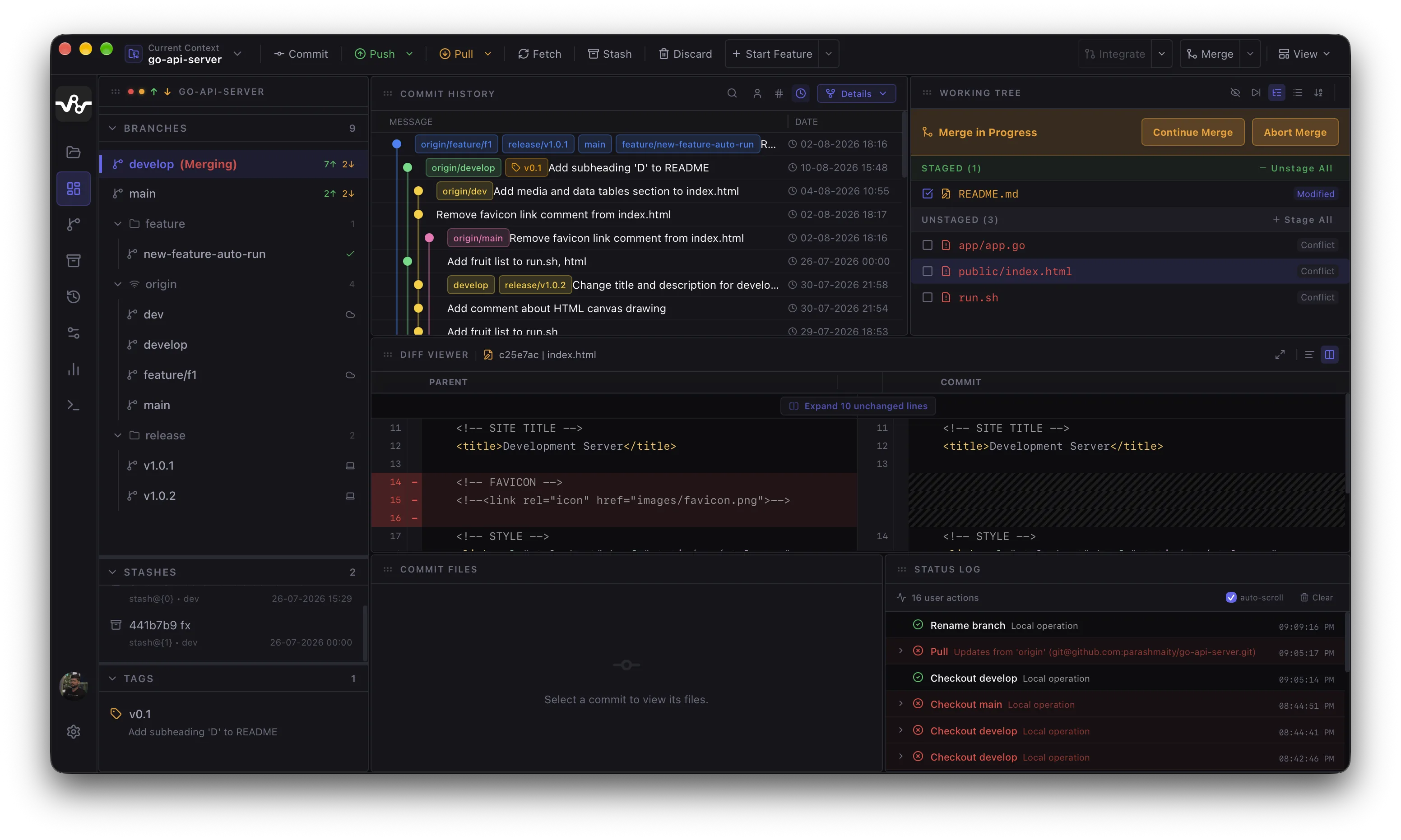
GitRoute Main Interface — full 4-panel layout

Sidebar

Branches, Stashes, and Tags grouped and expandable. Current branch highlighted with ahead/behind counts.

Commit History

Full timeline with colorful branch labels, author, hash, and timestamp. Click any commit to inspect it.

Working Tree

Staged and Unstaged files with one-click Stage All / Unstage All. Conflict files flagged in red.

Status Log

Real-time log of every git operation with success/error badges, timestamps, and expandable output.
Side-by-side Diff Viewer
02 — Diff Viewer

Side-by-side
Diff Viewer

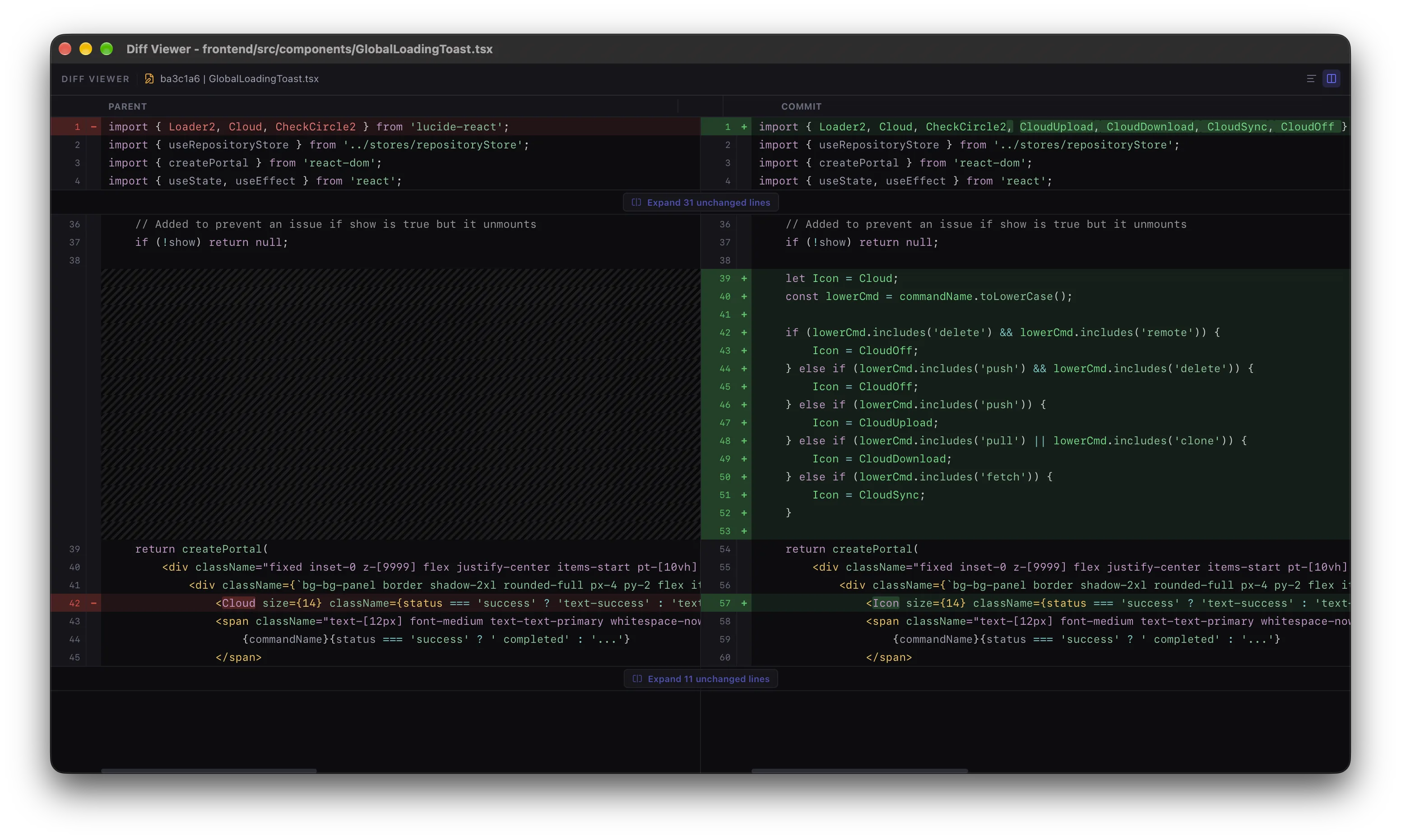
GitRoute opens a dedicated Diff Viewer window for any commit or file. Parent code on the left, new commit on the right — unchanged context is collapsed into an "Expand N unchanged lines" toggle so you focus only on what changed.

  • ✓Parent vs Commit side-by-side layout with synchronized scrolling
  • ✓Red line deletions on the left, green additions on the right — monospace font for code clarity
  • ✓Collapsible unchanged sections with one-click expand to see full file context
  • ✓File name and commit hash shown in the toolbar — navigate between changed files in the commit
git diff git show git diff --staged
03 — Merge Conflicts

3-Way Merge
Conflict Resolution

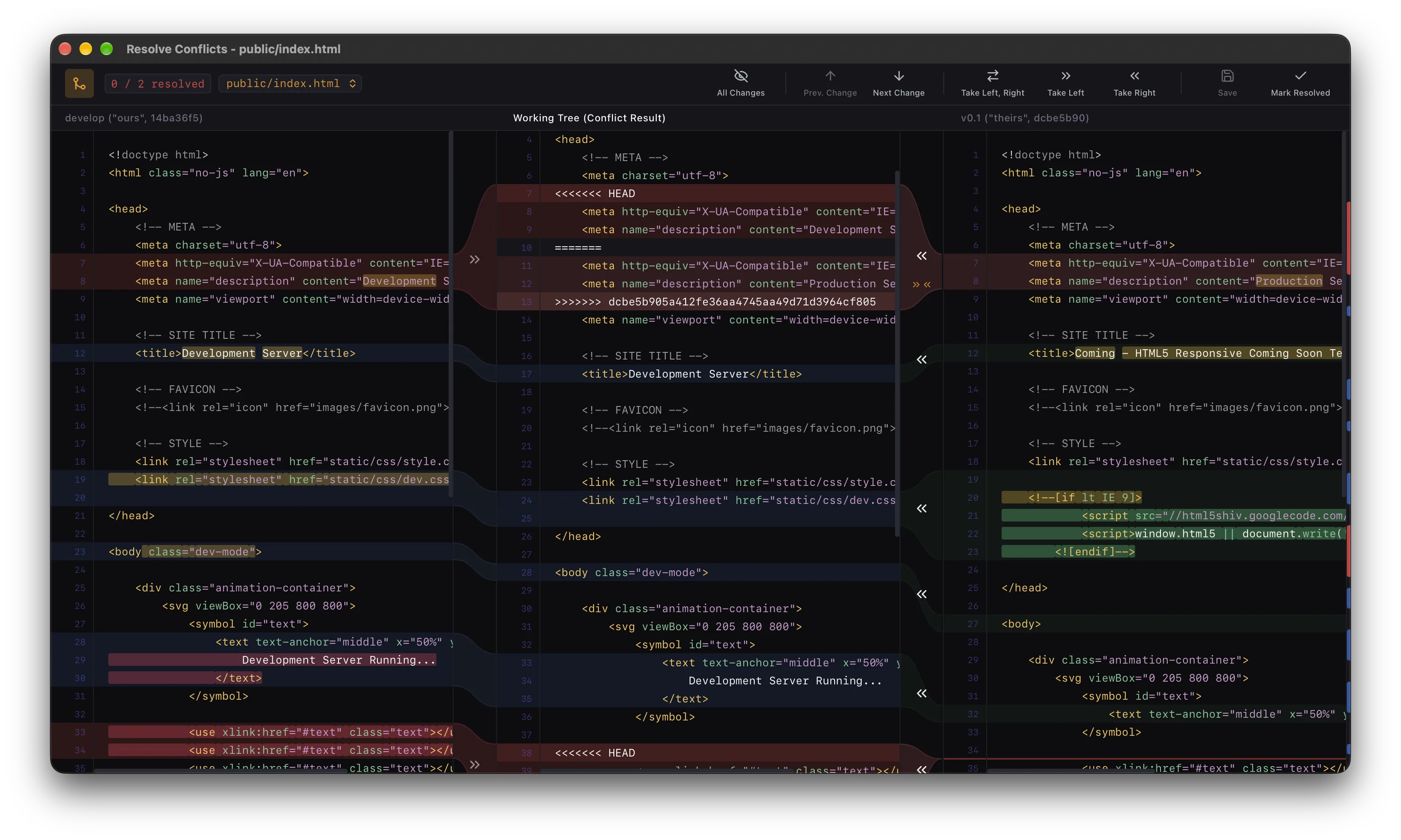
When a merge conflict is detected, GitRoute opens a purpose-built Resolve Conflicts window. Three panels — Ours (left), Working Tree Result (center, editable), and Theirs (right) — let you see exactly what both branches contain and construct the final resolution without writing raw conflict markers.

  • ✓Conflict counter — "0 / 2 resolved" badge tracks your progress through each file
  • ✓Take Left / Take Right / Take Left+Right one-click resolution buttons per conflict hunk
  • ✓Prev. Change / Next Change navigation to jump between conflict hunks instantly
  • ✓Mark Resolved button stages the file once every conflict is addressed
  • ✓Branch labels ("ours", "theirs") shown with commit hash for clear context
git merge git rebase git cherry-pick
3-Way Merge Conflict Resolution Window
04 — Core Workflow

Commit History &
Side-by-side Diff

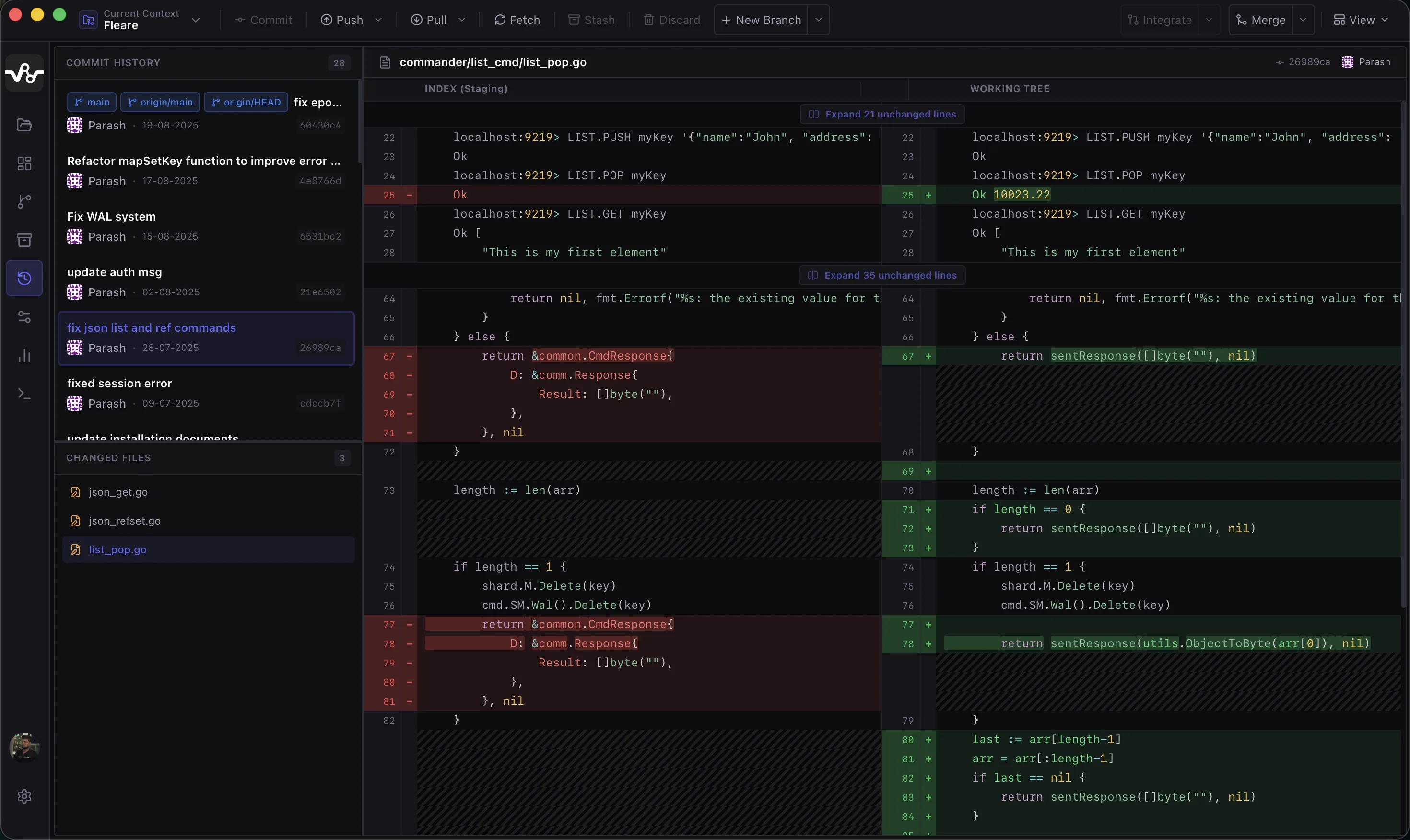
Browse your entire commit history in a dedicated timeline. Select any commit to instantly open a full side-by-side diff showing Index (Staging) vs Working Tree — unchanged context lines are hidden by default and can be expanded with one click.

  • ✓28-commit history with author avatar, hash, date, and message
  • ✓Red / green line-level diff with collapsible unchanged sections
  • ✓Changed files list per commit with file-level navigation
  • ✓Branch labels (main, origin/main, origin/HEAD) pinned to commits
  • ✓Push, Pull, Fetch, Stash, Discard, New Branch toolbar — always visible
git log git diff git show
Commit History and Side-by-side Diff Viewer
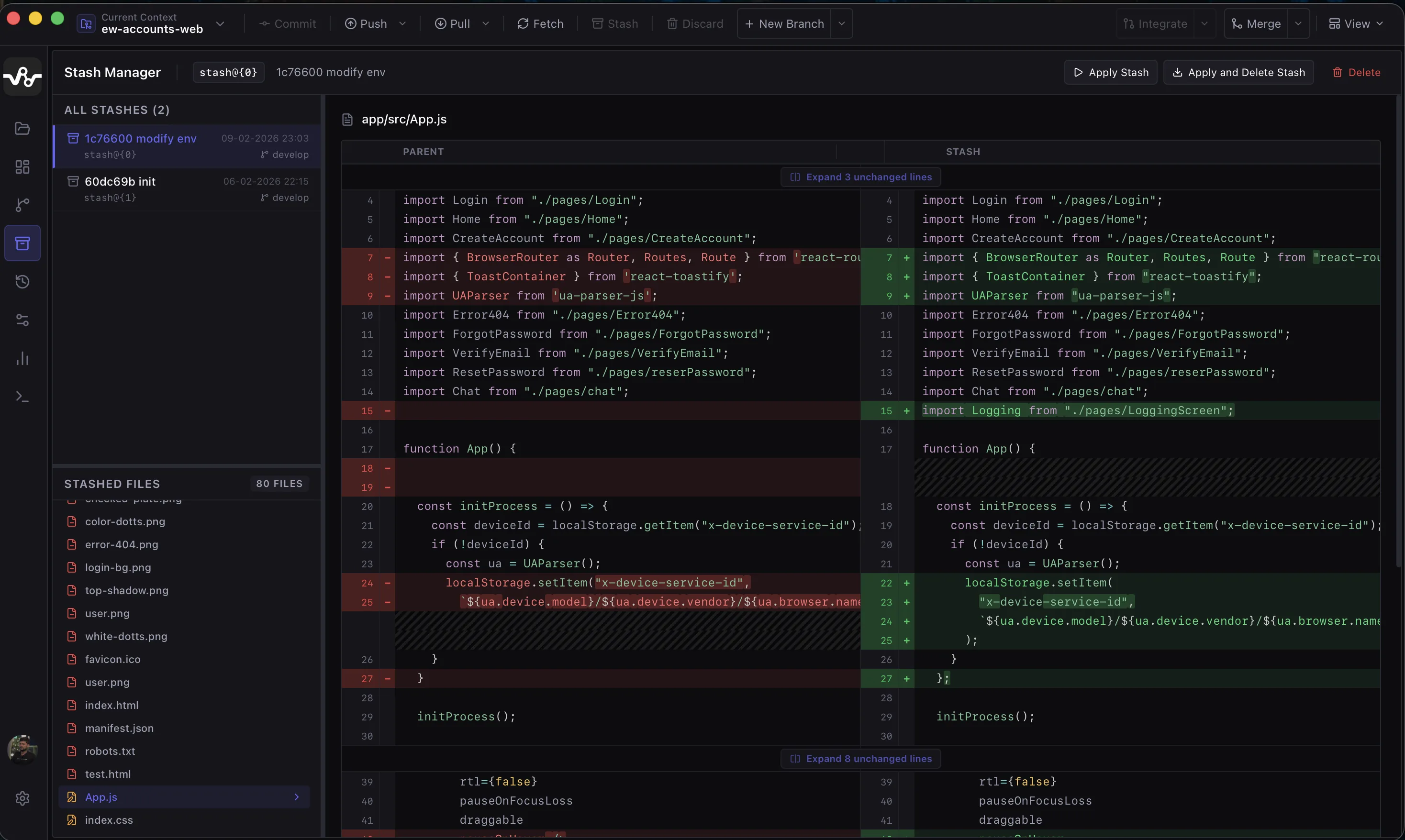
Stash Manager with Parent vs Stash diff
05 — Stash Manager

Visual Stash
Management

GitRoute's dedicated Stash Manager lists every saved stash with its message, timestamp, and branch. Select any stash to see a Parent vs Stash side-by-side diff showing exactly what changed — no guessing what you saved.

  • ✓All stashes listed with ref index, message, date, and branch name
  • ✓Apply Stash — Restore without removing the stash entry
  • ✓Apply and Delete Stash — Pop in one click
  • ✓Delete — Permanently drop a stash entry
  • ✓80 stashed files visible per stash with per-file diff navigation
git stash git stash pop git stash drop
06 — Analytics

Repository
Analytics Dashboard

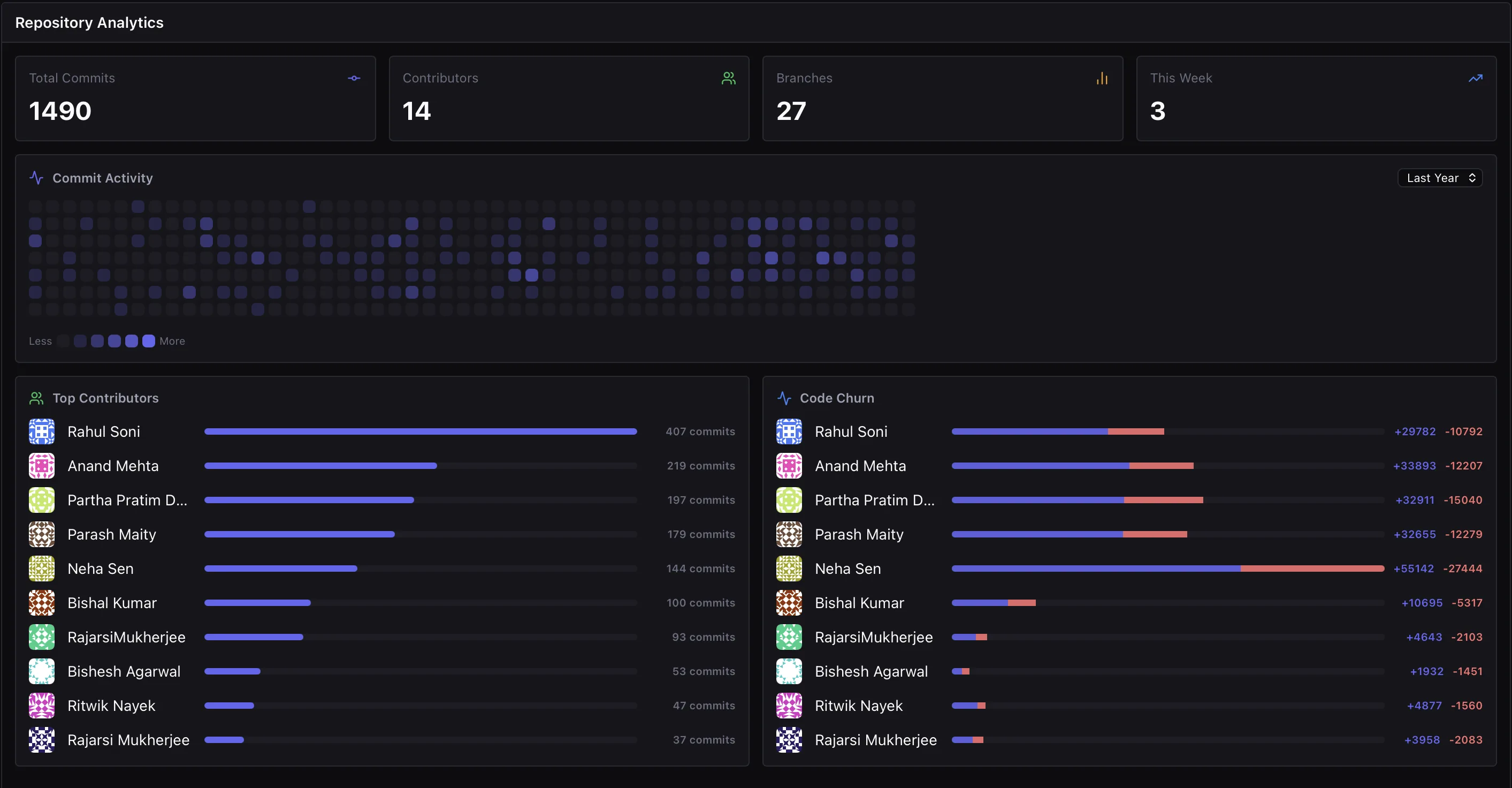
Get an at-a-glance picture of your repository health. The Analytics dashboard shows total commits, contributor count, branch count, and this week's commits — all without leaving the app.

Total Commits

1,490

Contributors

14

Branches

27

This Week

3

  • ✓Commit Activity heatmap — GitHub-style calendar showing daily commit frequency
  • ✓Top Contributors — ranked bar chart with commit count per author
  • ✓Code Churn — lines added vs deleted per contributor with visual bars
  • ✓Filter heatmap by Last Year, Last Month, or All Time
Repository Analytics Dashboard
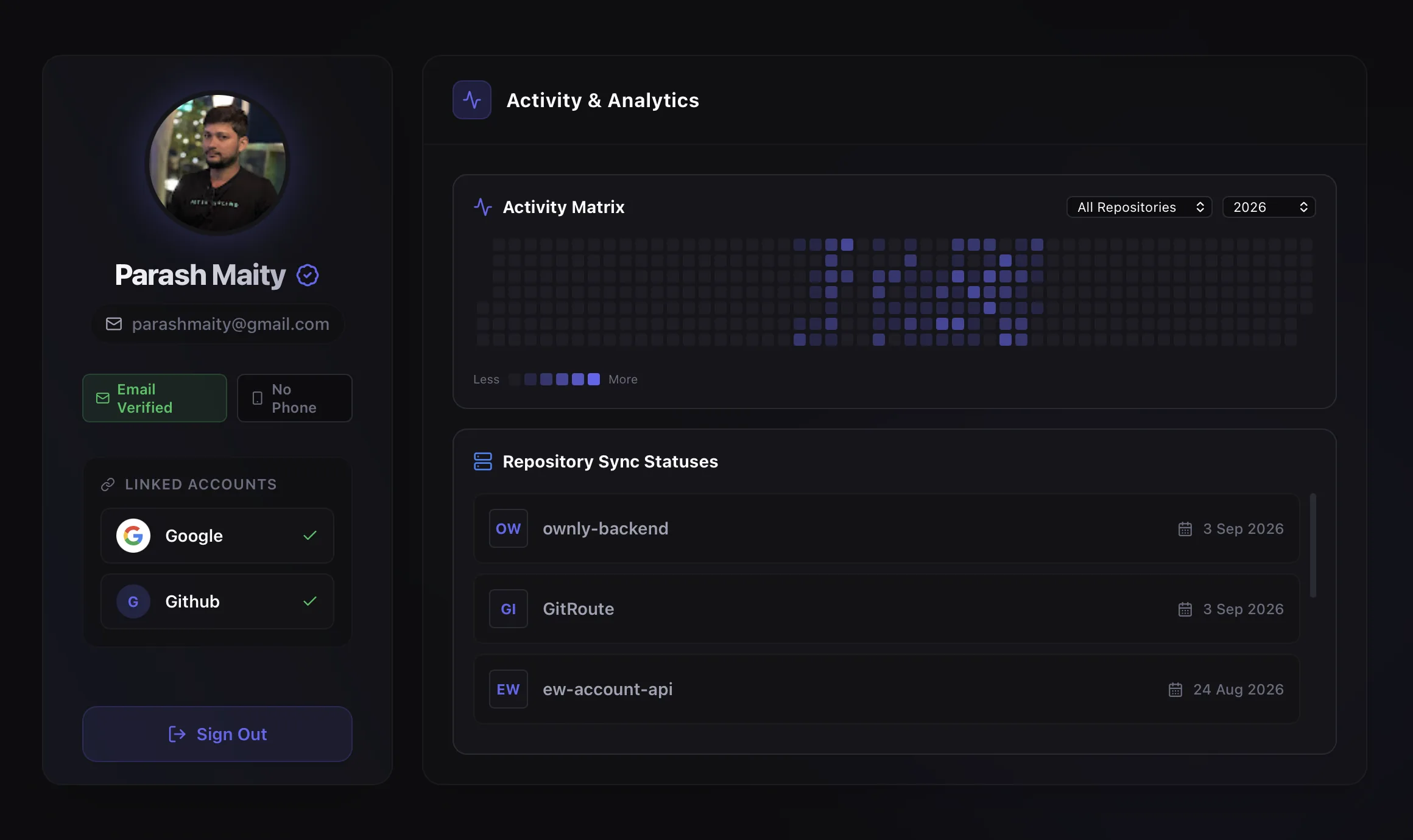
GitRoute User Profile and Activity Matrix
07 — Profile

Personal Activity
& Linked Accounts

Your GitRoute profile brings together identity and contribution data in one place. See your personal commit heatmap across all repositories, verify your linked accounts, and manage repository sync statuses at a glance.

  • ✓Activity Matrix — personal commit heatmap filtered by repo and year
  • ✓Linked Accounts — Google and GitHub with verified status badges
  • ✓Repository Sync Statuses — last sync date per repository
  • ✓Email verification status and connected identity providers shown inline
08 — Remotes

Remote Configurations
& Branch Tracking

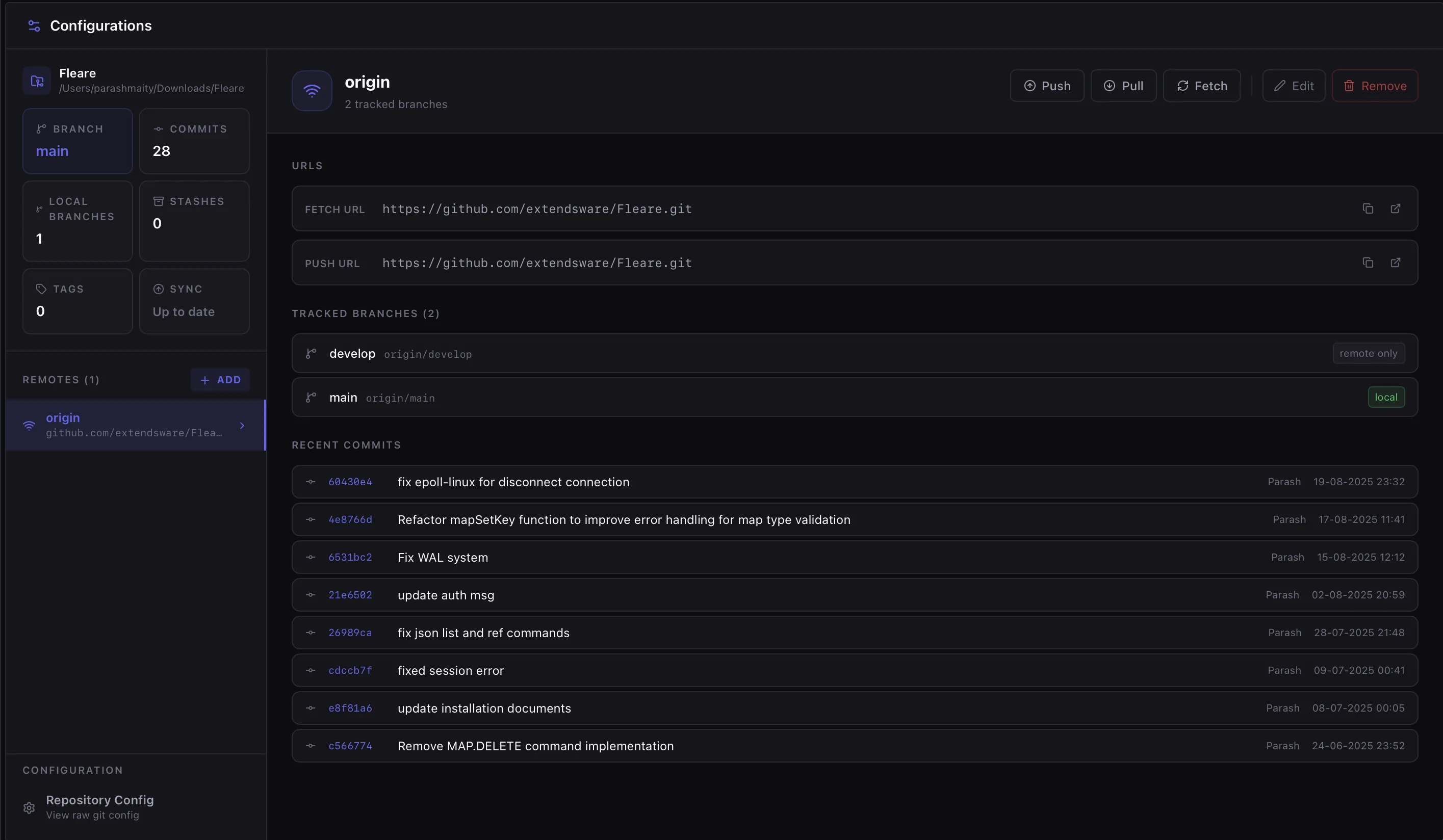
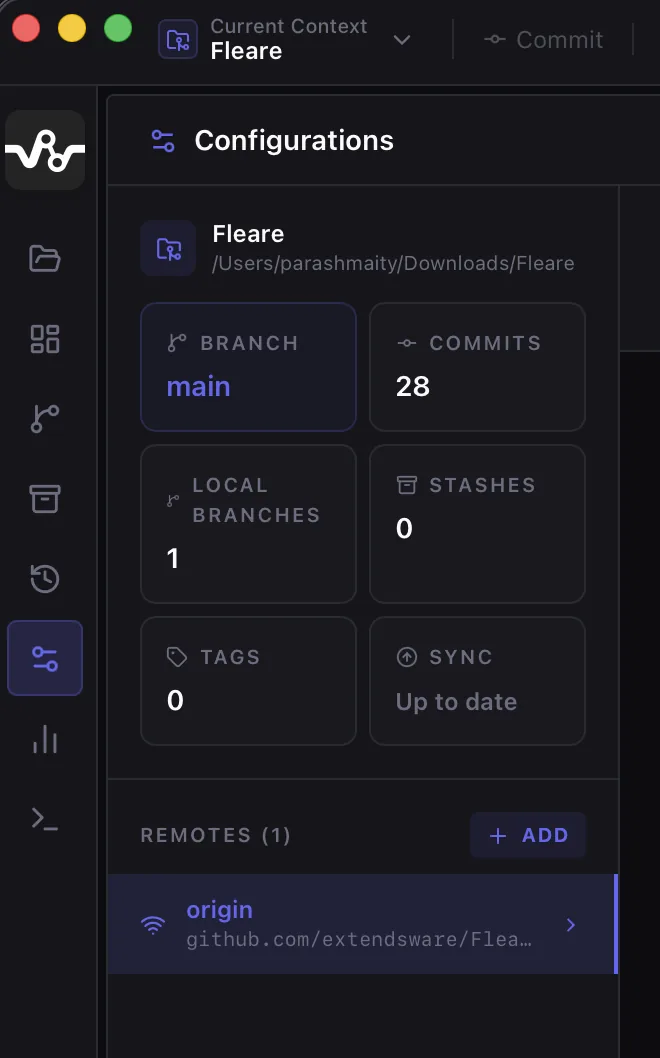
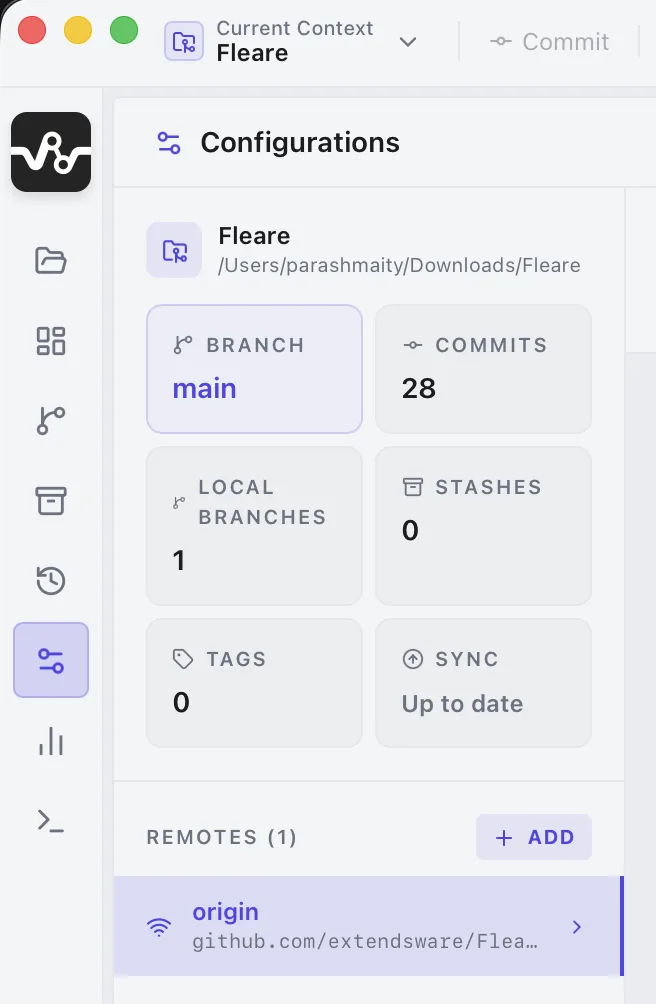
The Configurations panel gives you a visual overview of your remotes — their fetch/push URLs, tracked branches, and recent commits — with one-click Push, Pull, and Fetch buttons right next to the remote name.

FETCH URL https://github.com/extendsware/Flare.git
PUSH URL https://github.com/extendsware/Flare.git
  • ✓Tracked branches with local/remote-only tags per branch
  • ✓Recent Commits from the remote — hash, message, author, timestamp
  • ✓Repo summary cards: Branch, Commits, Local Branches, Stashes, Tags, Sync status
  • ✓+ ADD remote button — add new remotes without opening a terminal
Remote Configurations and Branch Tracking
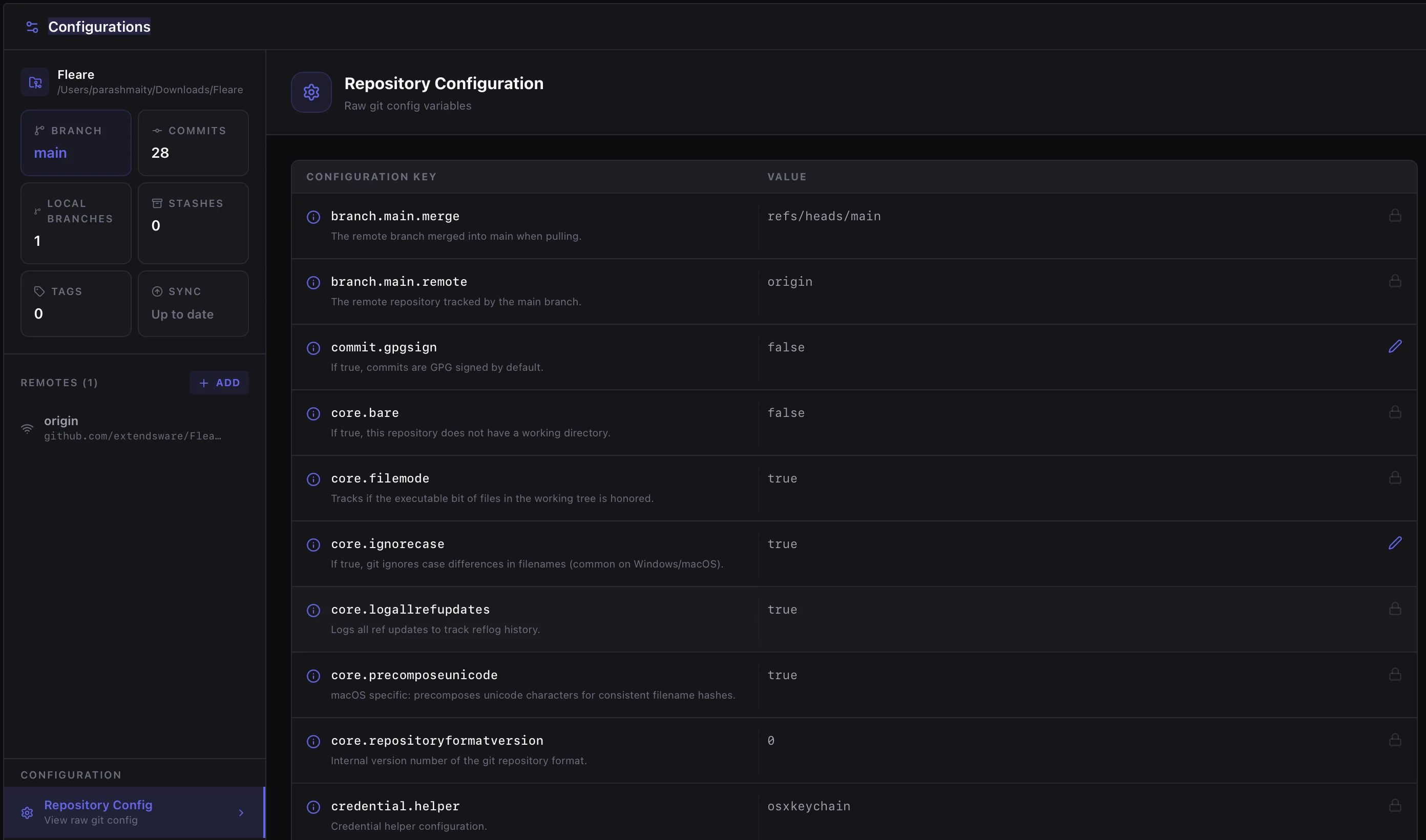
Repository Git Configuration Editor
09 — Config Editor

Repository Git
Config Editor

View and edit raw .git/config variables directly in the app — no need to open a file editor. Each key is documented with a plain-English description of what it controls.

Config Key Value
branch.main.mergerefs/heads/main
branch.main.remoteorigin
core.ignorecasetrue
credential.helperosxkeychain
  • ✓All raw git config variables exposed in a searchable, editable table
  • ✓Info tooltip on each key explains exactly what it does
  • ✓Lock icon on read-only system keys; pencil icon on editable keys
  • ✓Separate Global Git Configuration panel for ~/.gitconfig variables
10 — Settings

Fine-grained
Settings Control

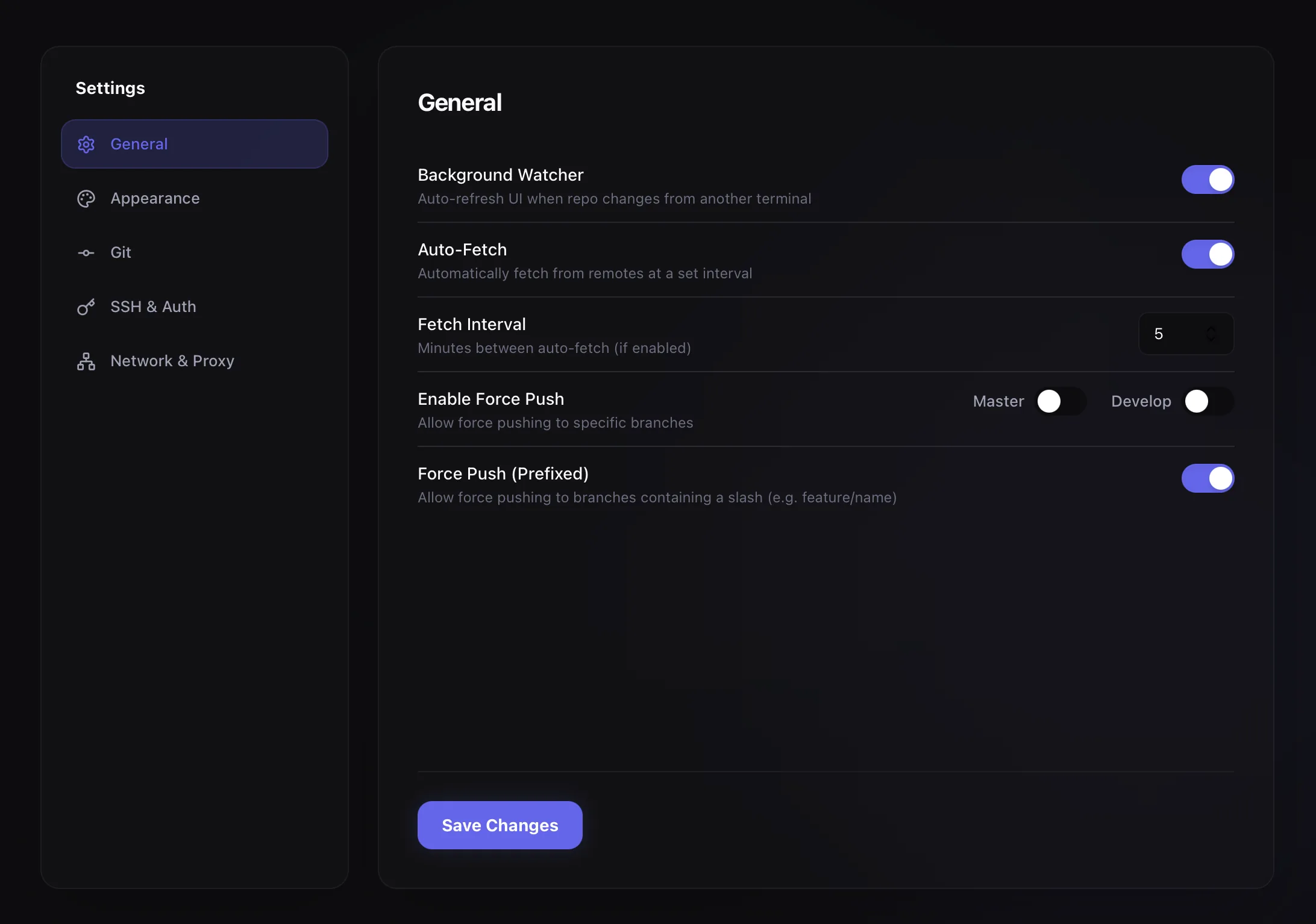
GitRoute settings are split into focused panels: General, Appearance, Git, SSH & Auth, and Network & Proxy — each accessible from the sidebar without leaving the app.

Background Watcher

Auto-refresh UI when repo changes from another terminal

Auto-Fetch

Automatically fetch from remotes at a set interval

Fetch Interval

Minutes between auto-fetch (if enabled)

5 min

Force Push (Prefixed)

Allow force pushing branches containing a slash (e.g. feature/name)

  • ✓Per-branch Force Push toggle (Master / Develop independently)
  • ✓Global Git Config editor under Settings → Git
  • ✓SSH key management under Settings → SSH & Auth
GitRoute Settings Panel
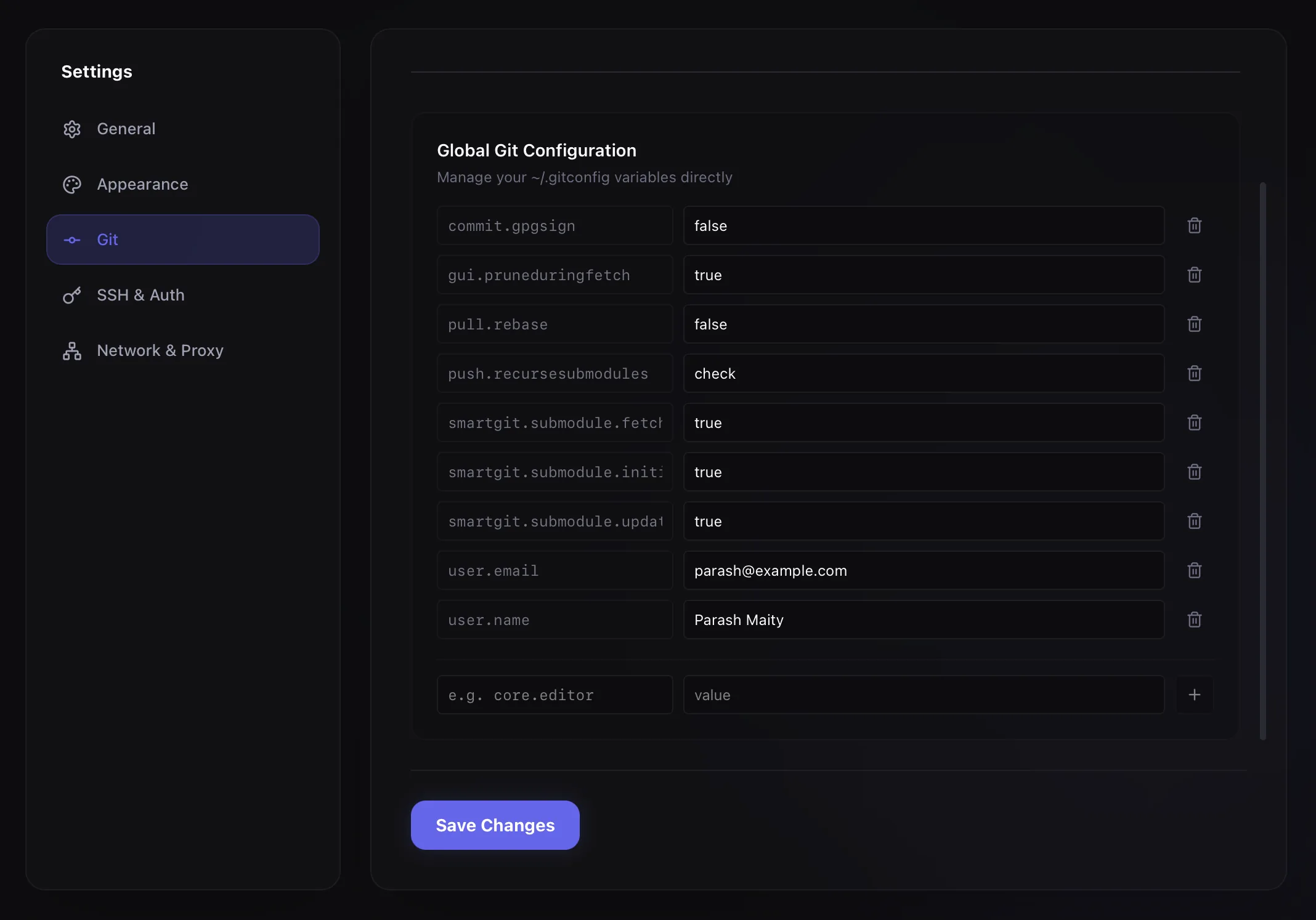
Global Git Configuration Editor
11 — Git Config

Global Git
Configuration Editor

Edit your ~/.gitconfig variables directly inside GitRoute. Add new keys with the inline form at the bottom, and delete entries with the trash icon — no terminal or text editor required.

user.nameParash Maity
user.emailparash@example.com
pull.rebasefalse
commit.gpgsignfalse
gui.pruneduringfetchtrue
  • ✓All ~/.gitconfig keys displayed in editable rows
  • ✓Add new key-value pairs via the inline input row at the bottom
  • ✓Submodule settings (fetch, init, update) supported
  • ✓Changes saved to disk with the Save Changes button
12 — Terminal

Built-in Terminal
with Repo Context

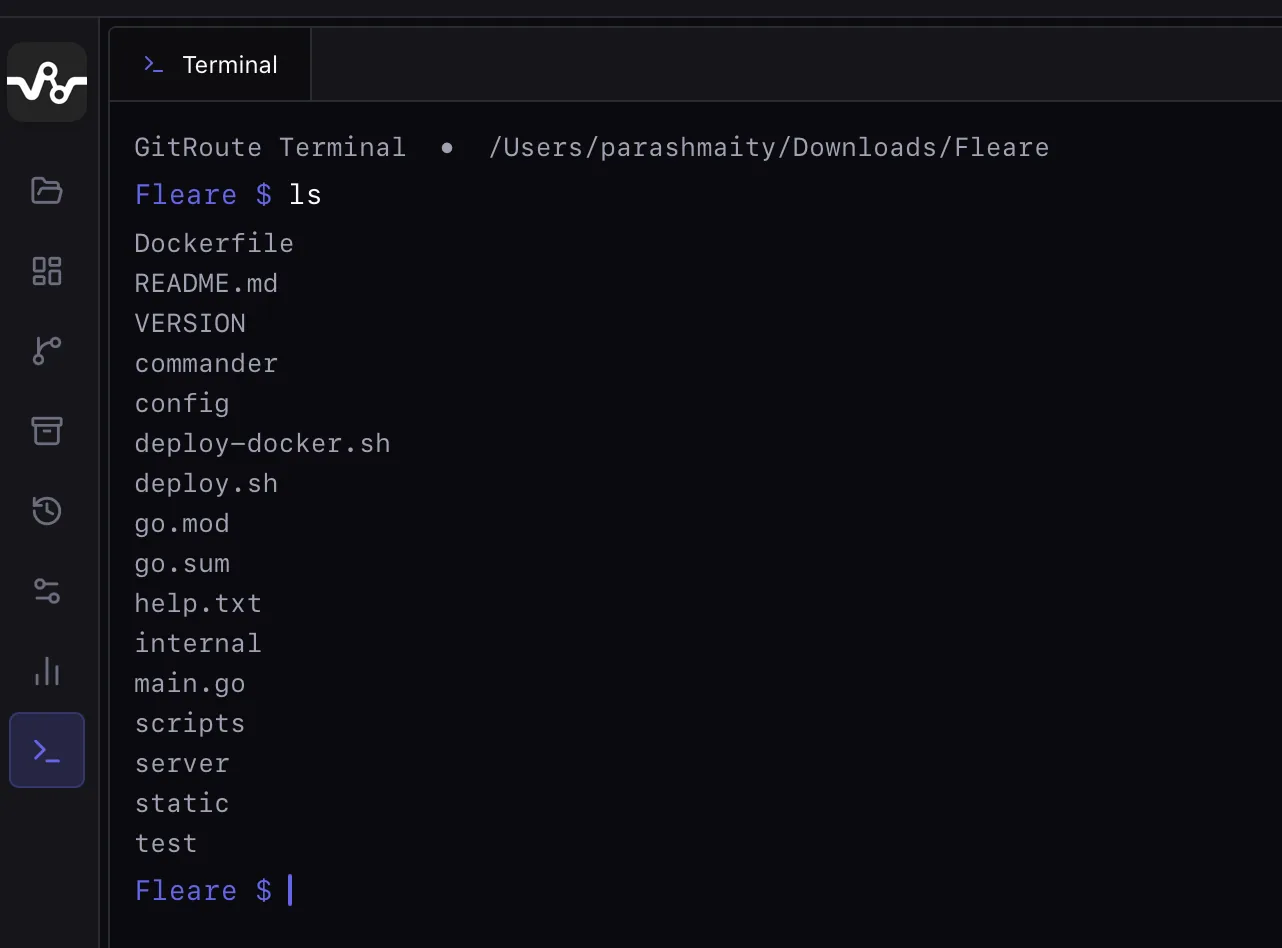
When you need the raw power of the command line, GitRoute has a built-in terminal tab that opens pre-configured to your current repository's directory — no need to cd anywhere.

Terminal — /Users/parashmaity/Downloads/Flare

GitRoute Terminal • /Users/parashmaity/Downloads/Flare

Flare $ ls

Dockerfile README.md VERSION commander config
deploy.sh go.mod go.sum main.go scripts server

Flare $ ▌

  • ✓Opens directly in the active repository's root directory
  • ✓Inherits GitRoute's injected SSH keys and PATH configuration
  • ✓Coloured prompt with current repo name for quick visual context
  • ✓Terminal changes (commits, branches) immediately reflected in the UI
Built-in Terminal with Repository Context
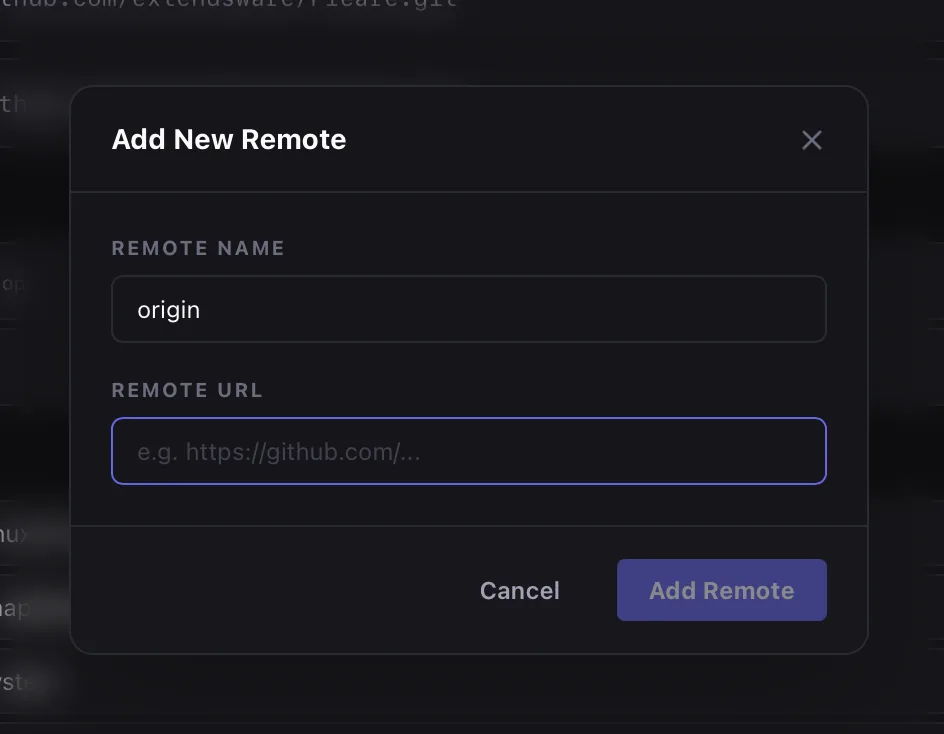
Add New Remote Dialog
13 — Remotes

Add Remotes
Without a Terminal

The Add New Remote dialog makes it trivially easy to connect a repository to a new remote. Just enter the remote name (conventionally origin) and the URL — HTTPS or SSH, both supported.

  • ✓Native modal dialog — no terminal needed
  • ✓Remote Name field pre-filled with origin as a sensible default
  • ✓Accepts both https:// and git@ SSH URL formats
  • ✓Remote appears instantly in the Configurations panel after adding
14 — Appearance

Multiple Themes,
Your Way

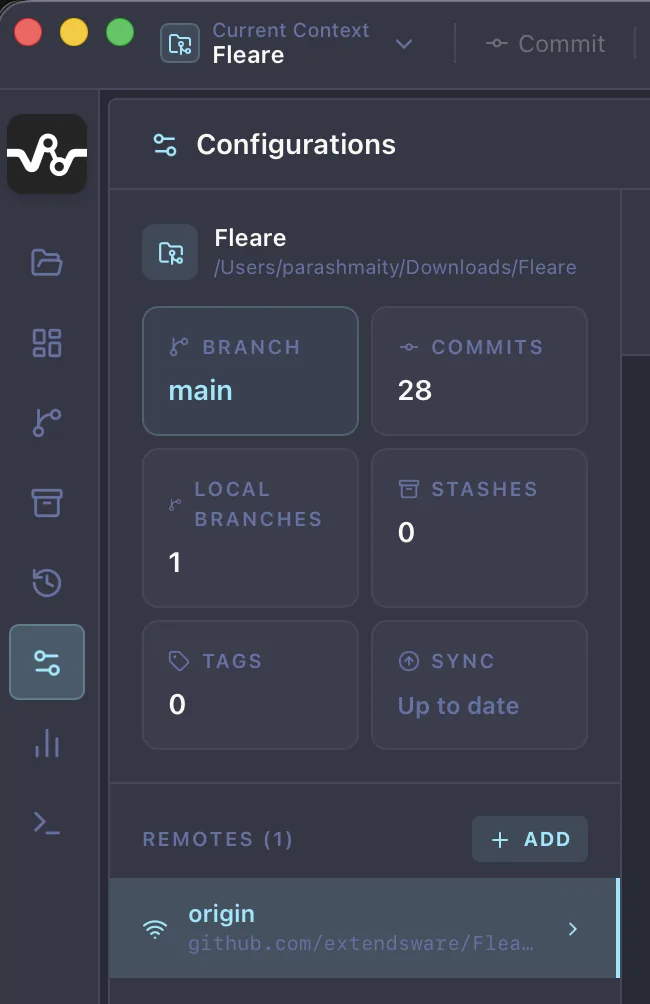
GitRoute ships with Dark, Dracula, and Light themes — plus more coming. Switch in Settings → Appearance instantly with no restart required.

GitRoute Dark Theme

Dark

Default. Easy on the eyes.

GitRoute Dracula Theme

Dracula

Purple-rich, high contrast.

GitRoute Light Theme

Light

Clean and bright.

Everything else you'd expect

A complete feature set, carefully built so every workflow is covered.

⚡

Real-time File Watching

FSNotify watches HEAD, index, refs/ and refreshes the UI within 500 ms when any external tool makes a change.

🔀

Branch Management

Create, switch, delete, and track branches from the sidebar. GitRoute automatically creates a local tracking branch when you checkout a remote branch.

⚔️

3-Way Merge Conflict Resolution

When a merge conflict is detected, a dedicated window shows Ours, Theirs, and an editable Result panel side-by-side. Resolve without leaving the app.

🔐

GitHub OAuth Device Flow

Login to GitHub without typing a password. GitRoute handles the device code flow and stores the encrypted token in the local database automatically.

🗝️

Per-repo SSH Keys

Assign a different SSH private key to each repository — ideal for managing multiple GitHub accounts. GitRoute injects GIT_SSH_COMMAND automatically.

🏷️

Repository Groups

Organize dozens of repositories into named groups — Work, Open Source, Archived. All metadata lives in a local SQLite database, never touching your repo files.

📋

Command Log

Every Git command GitRoute executes is logged with its output, duration, and status badge. Toggle ⌘L to show or hide. Filter read-only commands to reduce noise.

🌐

Network & Proxy Support

Configure HTTP/HTTPS proxy settings under Settings → Network & Proxy so GitRoute can work in corporate or restricted network environments.

🖥️

Native on macOS, Windows & Linux

It runs as a real native binary — no Electron, no browser runtime weight. Tiny binary, fast startup, low memory.

Ready to ship faster?

Download GitRoute for free — available for macOS, Windows, and Linux.